By Mike Rux · Published August 6, 2024 · Updated July 31, 2026
TL;DR
- Cumulative layout shift (CLS) measures how much your page visibly jumps around while loading. Google scores it as one of three Core Web Vitals, alongside LCP and INP.
- A good CLS score is 0.1 or less for at least 75% of page loads.
- Only 33% of websites pass the Core Web Vitals threshold (Ahrefs, 2026), passing is a real differentiator, not table stakes.
- The usual causes are images without dimensions, late-loading ads and embeds, and web fonts swapping in. All fixable.
- Measure with Search Console’s Core Web Vitals report (field data) and PageSpeed Insights (lab data), fix, then request revalidation.
Ever tried to tap a button on your phone and had it leap away as an ad loaded, so you tapped something else instead? That’s layout shift. It’s one of the fastest ways to burn a visitor’s patience, and Google measures it, scores it, and factors it into how your pages rank. Optimizing your website for user experience and SEO are the same job here: a stable page keeps visitors moving toward your call, form, or booking button instead of rage-tapping the wrong link.
This post covers what CLS is, why it matters for search in 2026, and the practical fixes we apply on client sites.
What Is Cumulative Layout Shift?
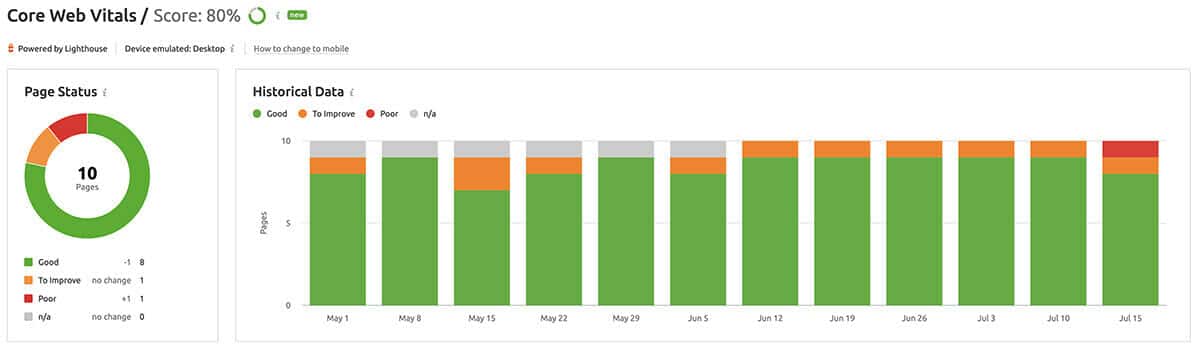
Cumulative layout shift (CLS) is a Core Web Vitals metric that measures how much a page’s visible content unexpectedly moves during loading. Google calculates it from real user visits: every time an element shifts after it’s rendered, a button, a headline, an image, the shifts accumulate into a single score. Lower is better, because a stable page is a usable page.
CLS sits alongside two other Core Web Vitals: LCP (Largest Contentful Paint, how fast your main content appears) and INP (Interaction to Next Paint, which replaced First Input Delay as the responsiveness metric in 2024). Together they’re Google’s measurement of “page experience”, a set of ranking signals introduced with the Page Experience update in 2021 and still reported in Search Console today.
What Is a Good CLS Score?
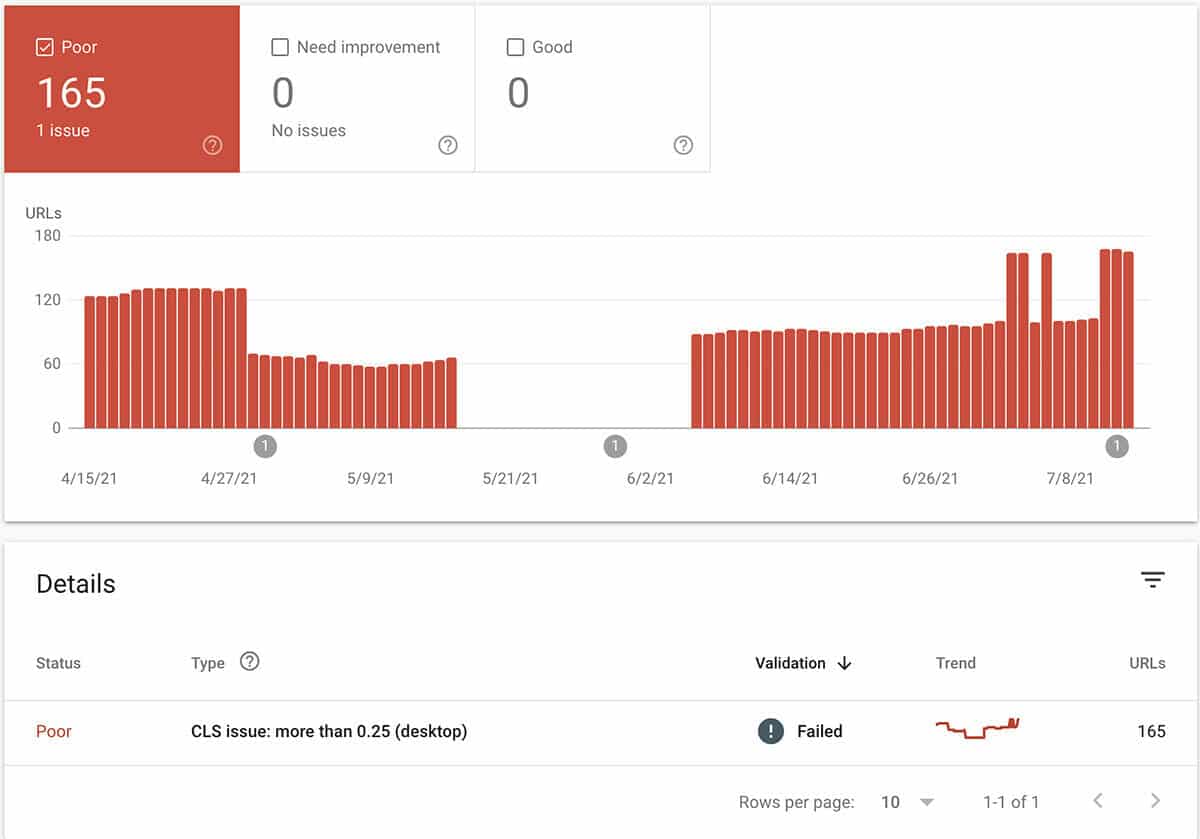
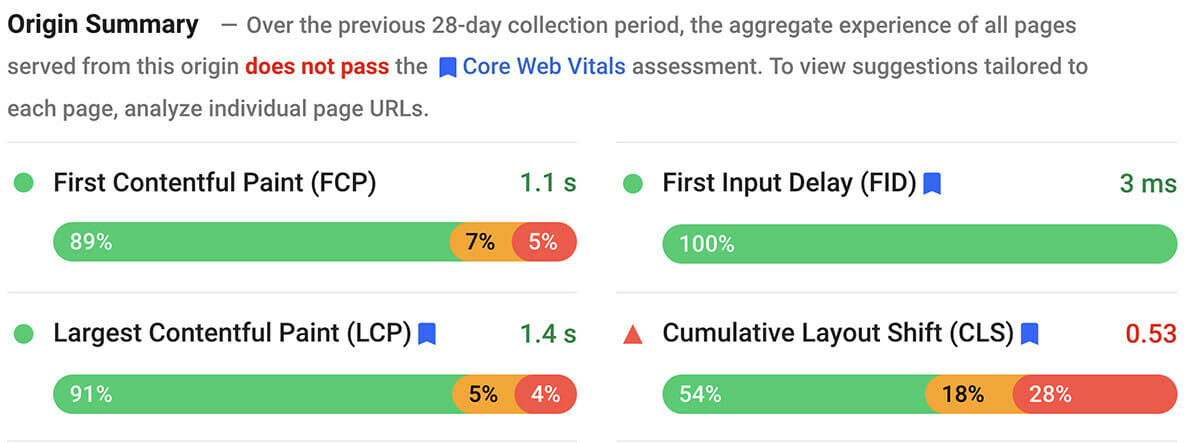
A good CLS score is 0.1 or less, measured at the 75th percentile of real page loads, meaning at least three out of four visits to your page should stay under 0.1. Scores between 0.1 and 0.25 “need improvement,” and anything above 0.25 is rated poor in Google’s reporting.
Most sites don’t clear the bar. Only 33% of websites pass the Core Web Vitals threshold (Ahrefs, 2026), and 72.3% of websites have slow pages. Practically, that means a passing site is ahead of two-thirds of the web, including, very likely, your local competitors.
Does CLS Affect SEO?
Yes, CLS affects SEO as part of Google’s page experience signals, and it affects conversions even more directly. Google uses Core Web Vitals data from real Chrome users in its ranking systems, and 96.6% of all Google search clicks go to first-page results (Ahrefs), so experience signals that help you onto page one carry real revenue weight.
Two honest caveats from practitioners:
- CLS is a tiebreaker, not a magic lever. Content and relevance still decide most rankings. But when you and a competitor are otherwise close, page experience separates you, and 42.3% of SEO professionals say technical SEO enhancements delivered their greatest positive impact in the past year (Search Engine Journal, State of SEO 2026 survey of 371 professionals).
- The conversion case is bigger than the ranking case. A page that jumps while someone tries to tap “Call Now” loses that call. You don’t need an algorithm to punish you when your own layout does.
Both cases point the same direction: fix it.
How Do I Measure CLS?
Measure CLS with two free Google tools: the Core Web Vitals report in Google Search Console for field data (how real visitors experience your site over 28 days) and PageSpeed Insights or Lighthouse for lab data (a repeatable diagnostic you can run before and after fixes).
The workflow we use on client sites:
- Open Search Console → Core Web Vitals. This groups your URLs into Good / Needs improvement / Poor, based on real-user Chrome data.
- Run the worst URLs through PageSpeed Insights. It shows exactly which elements shifted and by how much.
- Fix, then validate. After deploying fixes, use the “Validate fix” button in Search Console. Google re-monitors the URLs and confirms the repair, a feedback loop most site owners never touch.
We also monitor Core Web Vitals through Semrush’s site audit tooling on retainer accounts, so regressions get caught before Google’s 28-day window fills with bad data.
How Do I Fix CLS?
Fix CLS by reserving space for everything that loads late: give images and videos explicit dimensions, preload fonts, and never inject banners or embeds above content that’s already visible. Most CLS problems come from a handful of repeat offenders, and most have five-minute fixes.
| Cause of shift | Fix |
|---|---|
| Images without dimensions | Set width and height attributes (or CSS aspect-ratio) so the browser reserves space |
| Web fonts swapping in | Preload key fonts; use font-display: optional or swap with size-adjusted fallbacks |
| Ads, embeds, iframes | Reserve a fixed container of the largest likely size before they load |
| Cookie bars and banners | Overlay them; never push page content down after render |
| Dynamically injected content | Add new content below the viewport, not above existing elements |
| Slow-loading CSS | Inline critical CSS; let a caching plugin (we use WP Rocket) handle delivery |
On WordPress, your theme and page builder decide a lot of this for you, which is why we treat layout stability as a design decision, not a post-launch patch. That philosophy is covered in how web design and SEO work together, and it’s baked into every build from our web design and web development teams.
Why CLS Still Matters in the AI Search Era
AI Overviews and chatbots now answer many informational queries before anyone clicks. That makes the clicks you do earn more valuable, the average AI search visitor is worth 4.4x more than a traditional organic search visitor (Semrush AI search traffic study, 2025). When fewer, higher-intent visitors land on your pages, a layout that jumps out from under their thumbs is an expensive way to greet them. Stable, fast pages convert the traffic that still arrives; that’s the whole game in 2026.
Build Trust With Users and Google at the Same Time
CLS is one of the rare metrics where the user’s interest and Google’s interest are identical: nobody likes a jumpy page. Measure it in Search Console this week, fix the repeat offenders above, and validate the fix. If you’d rather hand the whole Core Web Vitals checklist, measurement, fixes, and revalidation, to a team that does it weekly, Ciphers Digital Marketing can help. More technical guides live on The Digital Climb.
Sources
- Ahrefs, “107 SEO Statistics for 2026”, https://ahrefs.com/blog/seo-statistics/ (Core Web Vitals pass rate, slow pages, first-page click share)
- Search Engine Journal, State of SEO 2026 survey (n=371, 52 countries), searchenginejournal.com (technical SEO impact)
- Semrush, “26 AI SEO Statistics for 2026”, https://www.semrush.com/blog/ai-seo-statistics/ (AI search visitor value)
- Google Search Central, Core Web Vitals report documentation, https://support.google.com/webmasters/answer/9205520