Our results:
TL;DR: Key takeaways
- We tested a verified Arizona service-area business (SAB) with a hidden address against Google’s Places API, the same API that powers thousands of directories, review tools, and marketing platforms.
- The listing is fully visible to customers on Google Maps. The API returned NOT_FOUND for the exact same listing, looked up by its own unique Google listing ID.
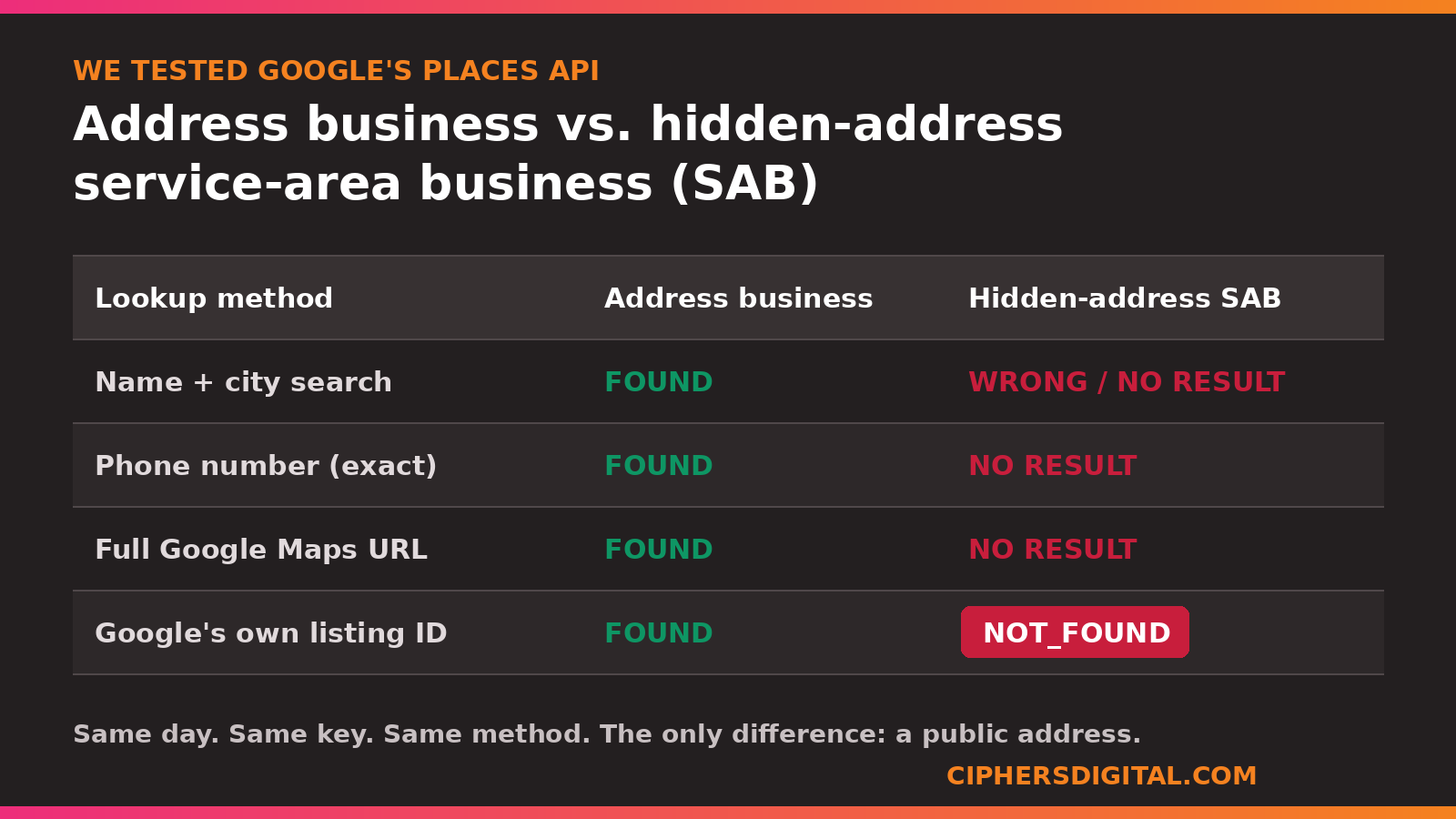
- An address-holding business we tested the same day came back instantly, by name and by phone number.
- This is not a ranking theory. It is an infrastructure fact you can reproduce yourself, and it means hidden-address businesses are invisible to a layer of Google’s ecosystem that address businesses get for free.
- SABs are not doomed. They need deliberate strategy because Google’s defaults work against them. That is exactly the work we do at Ciphers.
What happened, in plain English
We build internal tools at Ciphers Digital Marketing to speed up client onboarding. One of them pulls a client’s Google Business Profile data through Google’s Places API so our developer gets a clean, complete snapshot of the listing: categories, hours, reviews, coordinates, all of it.
It worked perfectly on businesses with storefronts. Then we pointed it at a service-area business, the kind of company that works from a home base and hides its address on Google, like most contractors, mobile services, and home-service companies. The API found nothing.
We assumed we had a bug. We spent hours ruling that out. We tried lookups by business name. By phone number. By the listing’s full Google Maps URL. Finally we pulled the listing’s unique internal ID, the code Google itself embeds in every Maps URL, and asked the API for that exact listing and nothing else.
Google’s answer: NOT_FOUND. “The provided Place ID is no longer valid.”
The same listing, at the same moment, was sitting live on Google Maps where any customer could find it.
The test, step by step
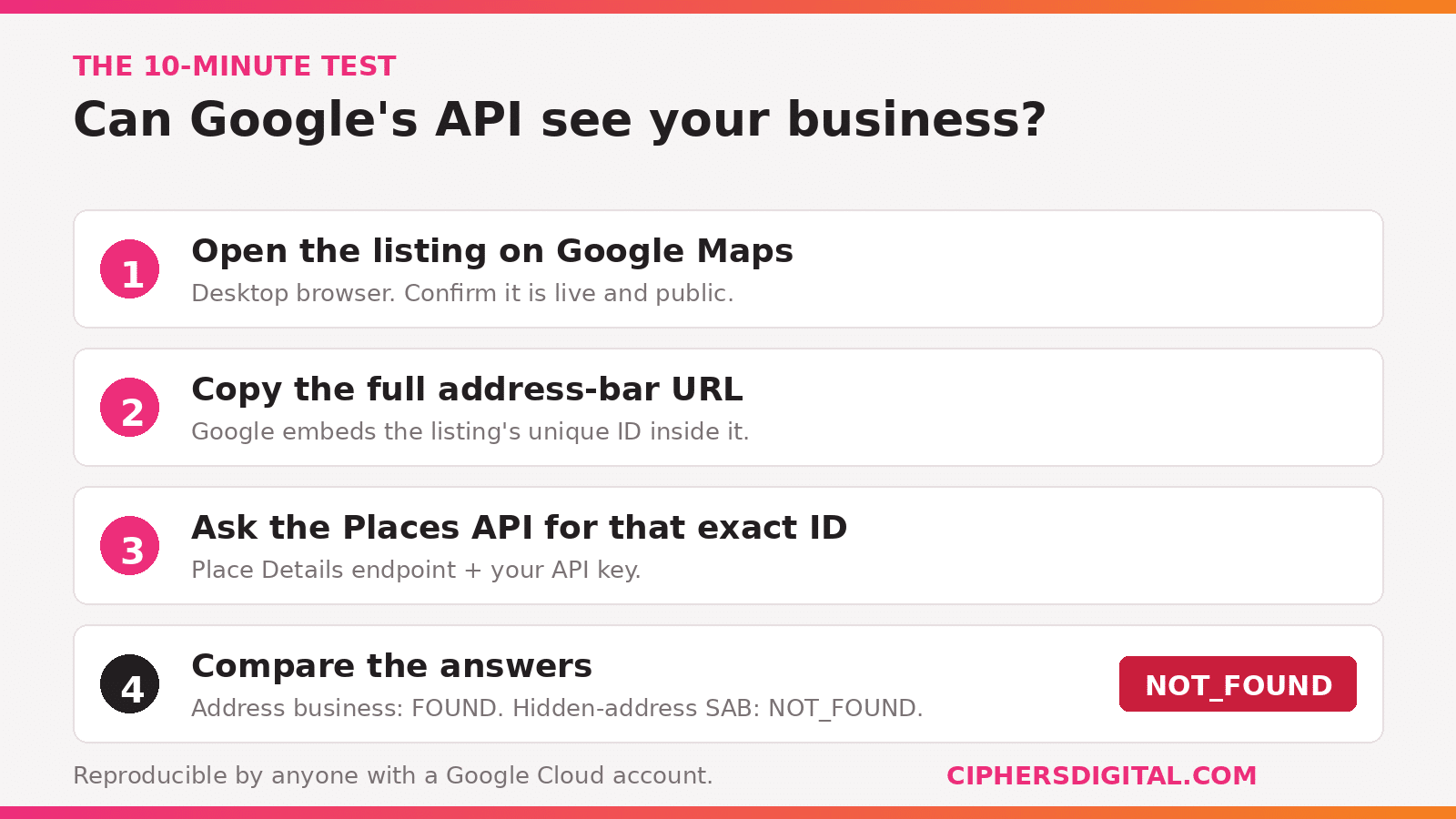
Anyone with a Google Cloud account can reproduce this in ten minutes. Here is the exact method:
- Open a verified hidden-address service-area business on Google Maps in a desktop browser. Confirm it is live and publicly visible.
- Copy the full URL from the address bar. Inside it, Google embeds the listing’s unique ID (a pair of hex codes; the format looks like 0x************:0x************).
- Call Google’s Place Details endpoint with that ID and a valid API key.
- Repeat the same call for a business with a public address.
| Lookup method | Address business | Hidden-address SAB |
|---|---|---|
| Name + city search | Found | Wrong or no result |
| Phone number (exact match) | Found | No result |
| Full Maps URL | Found | No result |
| Google’s own unique listing ID | Found | NOT_FOUND |
When the API cannot return a listing you request by Google’s own unique identifier for it, that is not a search relevance problem. The listing is excluded from the dataset.
Why does this matter if customers can still see the listing on Maps?
Because the Places API is not some obscure developer toy. It is the plumbing behind a large slice of the local search ecosystem, and being missing from it means being missing from everything built on top of it.
The Places API feeds third-party directories, review management platforms, “near me” features inside other apps, data aggregators, AI tools that look up business information, and countless marketing and reporting products. When a hidden-address business is absent from that dataset, every one of those systems treats it as nonexistent. No citation. No sync. No mention. The address business next door gets that distribution automatically, without lifting a finger.
And there is a second-order problem arriving fast: AI assistants and answer engines increasingly pull business data through APIs rather than scraping Maps. A business the API cannot see is a business AI tools struggle to recommend. For a company like ours that spends every day on AI visibility for clients, that is the part that should get every SAB owner’s attention.
Does this prove Google ranks SABs lower?
No, and we will not claim it does. Google has said hiding your address does not directly hurt ranking, and nobody outside Google can prove otherwise.
What we can prove, because we reproduced it and you can too, is an infrastructure disadvantage: hidden-address businesses are excluded from parts of Google’s ecosystem that address businesses are included in by default. Add the well-documented reality that proximity is a core local ranking factor, and that a hidden address gives Google no pin to anchor proximity to, and you get the pattern every SAB owner already feels: storefront competitors showing up where you do not.
We would rather hand you one verifiable fact than ten unprovable theories. This one is verifiable.
What should service-area businesses do about it?
You cannot make the API see you, but you can out-build the businesses it favors. The disadvantage is real; it is also beatable with structure.
Here is what actually moves the needle for the SABs we work with:
- Get and stay verified. An unverified or suspended profile is invisible everywhere, API and Maps alike. Verification is step zero. If your profile is stuck, start with our guide on avoiding Google Business Profile reverification.
- Build the service-area page architecture Google can anchor to. Since there is no address pin, your website has to do the geographic anchoring. This is the hub, spoke, and wheel structure we build for every client: one page per real service area, each with genuinely local content, none of them thin duplicates.
- Feed every signal the API cannot take away. Review velocity, precise categories, complete GBP fields, photos with real jobs, weekly activity. These flow through Maps and Search directly, no API required.
- Make your site the citable source. Schema markup, direct answers, and consistent NAP details give directories, AI tools, and answer engines a way to find and cite you that does not depend on Google’s dataset. This is core to the local SEO work we do for service-area businesses.
- Track what matters. If your reports only count map-pack rankings near your hidden pin, you are measuring the one thing stacked against you. We track service-area coverage, calls, and leads instead.
Questions we got when we shared this internally
Does hiding my address hurt my Google visibility?
It does not remove you from Google Maps or Search, and Google says it does not directly lower rankings. But our testing shows hidden-address listings can be excluded from Google’s Places API, which supplies business data to directories, apps, and AI tools. That is lost distribution address businesses receive automatically.
Should I just add my home address to fix this?
Usually no. Publishing a home address creates privacy and safety problems, and Google’s guidelines require hiding your address if customers do not visit it. Faking a storefront address violates policy and risks suspension, which is far worse. The fix is strategy, not a fake pin.
Why can’t third-party tools find my business?
If your business hides its address, there is a real chance the tool is querying Google’s Places API and your listing is not in that dataset. It is not the tool’s fault, and it is not yours. It is how Google serves (or does not serve) hidden-address listings to developers.
How do I know if my listing is affected?
If your profile is verified and live on Maps but SEO tools, directories, or data platforms keep telling you the business cannot be found, you are likely affected. We check this for clients during onboarding. It takes minutes with the right setup.
We ran this test on a verified Arizona service-area business we manage, with identifying details withheld for client privacy, and confirmed the contrast against address-holding businesses the same day. If you want us to check whether your business is visible to Google’s data ecosystem, get in touch.
Sources
- Google Business Profile guidelines: representing your business (service-area businesses and address display)
- Google Places API documentation: place IDs
- First-party testing by Ciphers Digital Marketing, August 2026 (this article)